
Installation using Non-Admin Service Account
- The AppViewX Windows Gateway can be installed using a service account that is part of the local administrator group account.
- In this case, the following command has to be executed from the
PowerShell:
netsh http add urlacl url=https://+:8999/appviewx/user=Username@domainname - In the above command, the value for
user =
                    <domainserviceaccount>
and theURLmust be changed respectively. - On the Regedit path, "HKEY_LOCAL_MACHINE\SYSTEM\CurrentControlSet\Services\EventLog\Application\AppViewXCertPlus" add the service account and give Full Control permission.
- On the Installation path of the application, the user needs permission to read and write.
- If the network has a policy that the service account cannot be part of the
administrator group or that the service account is only a part of the user group,
then:
- The AppViewX Windows Gateway is installed using an admin account.
- It is then associated with the service account in services.msc, by
adding the account in the properties of the AppViewXCertPlus service. Refer
to the following image.
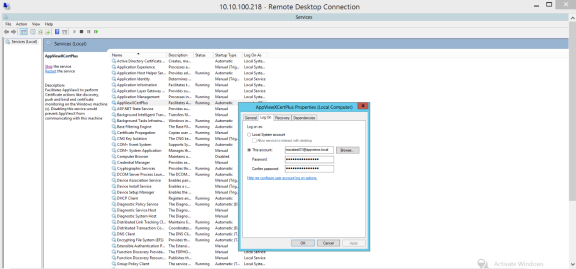
- Once this is done, stop and start the
AppViewXCertPlus Serviceinservices.msc.
