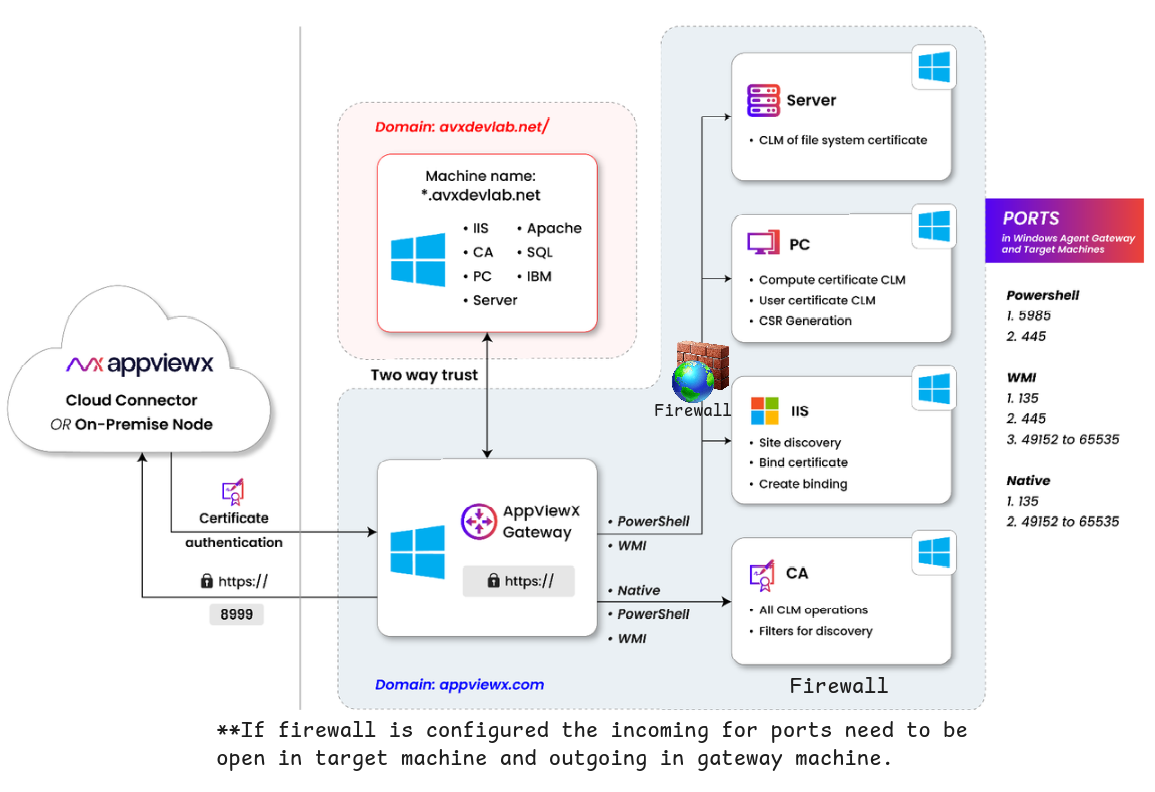
AppViewX Windows Gateway
The AppViewX Windows Gateway Service is a Windows Communication Foundation (WCF) service designed to enable secure, seamless communication between AppViewX and the Windows server infrastructure. This service supports a variety of critical features tailored for managing and securing Windows-based environments. The key capabilities offered by AppViewX for Windows Server Infrastructure are as follows
- Certificate Life Cycle Management (CLM) - AppViewX facilitates the complete
lifecycle management of digital certificates across various environments, including:
- Microsoft Servers
- Microsoft PC’S
- Microsoft IIS
- Microsoft SQL Servers
- Microsoft Certificate Authority (CA) Servers
- IBM WebSphere
- Windows WebLogic
- JBoss
- Windows Apache Servers
- Windows Tomcat Servers
Note:- Microsoft Server - Both certificate store and file system certificates can be managed.
- Microsoft PC - Only certificate store certificates can be managed.
- Certificate Binding for IIS and SQL Server - The service automates the binding of SSL/TLS certificates to only Internet Information Services (IIS) and SQL Server, ensuring secure communication channels for web applications and databases.
- Certificate Discovery - AppViewX provides capabilities to discover
certificates from multiple sources, including:
- File System (Only if onboarded as Microsoft Server)
- Windows Certificate Store
This feature enables streamlined identification and management of certificates deployed across different locations within the server infrastructure.
- Custom Script Execution via PowerShell - AppViewX allows for the execution of custom scripts, providing administrators with the flexibility to automate and customize certificate management and other related tasks. This integration with PowerShell enhances the extensibility and control of the service.
This document is designed to assist in diagnosing and resolving issues related to the communication between the AppViewX Windows Gateway Service and the Windows server infrastructure within the customer environment. This guide provides step-by-step troubleshooting procedures, frequently asked questions, and solutions to common problems, enabling administrators to quickly identify and address communication challenges.