
Configuring Device Backup
- Go to Menu > ADC+ > CONFIG MANAGEMENT > Backup Configuration > Manage Backups.
- Click the + (Add) icon to navigate to the BackUp configuration page.
- Select individual devices or device groups for BackUp.
-
Provide the required details:
Table 1. Device Backup - Field and Description Table Name Description *Device Type Type of device to be selected (ADC,Proxy,WAF,Firewall) *BackUp Name BackUp name accepts only alphanumeric characters, '-' , '_' , '.'. Also should not start or end with a special character.
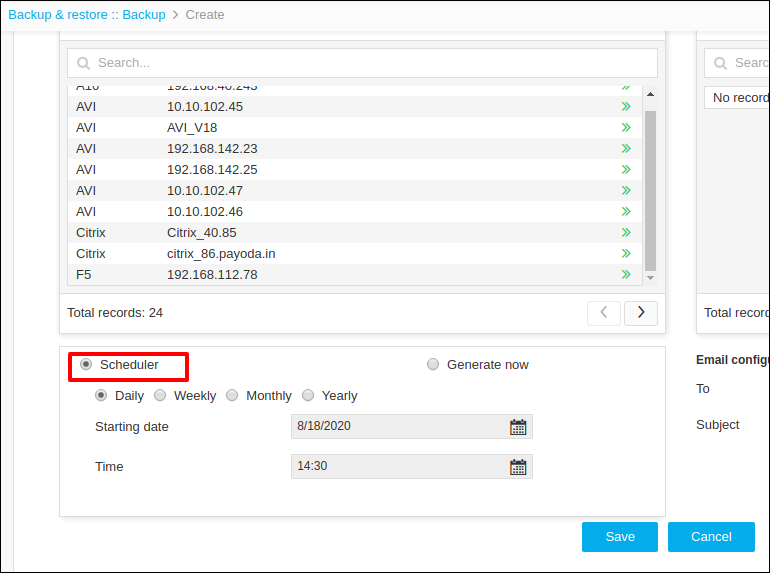
Description Type the appropriate descriptive content. *Configure Select the Device or Device Group radio button. *Device or Device Group selection Search and select device or device group. *Scheduler/Generate now Select the Scheduler or Generate now radio button. Email configuration to Type the email addrese(es). Email configuration subject Type the subject line to be included in the email. *: Mandatory fields - Schedule the BackUp by clicking Scheduler or Generate now.
-
Select the scheduler on Daily/Weekly/Monthly or Yearly basis and provide the
date and time appropriately.
- Click Save.
- To view BackUps generated in a particular group, click the + (Add) icon on the tab that has the backup group name.
-
To edit the already created BackUp group, click the
 (Edit) icon on the tab mentioned with the backup
group name.
(Edit) icon on the tab mentioned with the backup
group name.
