
Archive Setting Customization
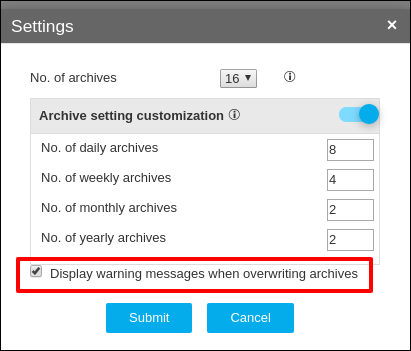
Users can customize the number of archives stored for devices based on daily/weekly/monthly/yearly.
- Go to Menu > CONFIG MANAGEMENT > Backup Configuration > Manage Backups.
-
Click the
 Settings icon on the top
right corner.
Settings icon on the top
right corner.
- Enable the Archive setting customization button.
- Provide the number of archives to be stored for devices on a daily/weekly/monthly/yearly basis.
-
Enable the radio button to display the warning message when archives are
overridden.
Enabling this will show a pop up if the number of archives configured by the user causes any removal/deletion of archives.
- Click Submit.
