
Apache SSM integration specification
Device Addition
-
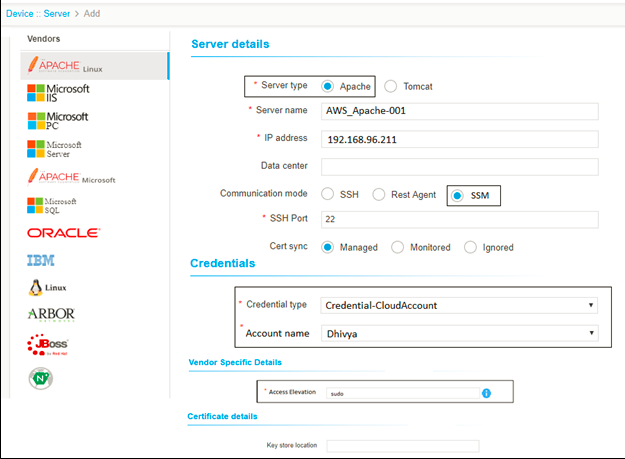
Apache (Linux) serversdiscovered from Amazon EC2 instances should be added under the Server tab in AppViewX.
- All the mandatory fields should be pre-fill in the Apache (Linux) device addition page.
- The server name should be appended with AWS as shown below.
- By default, the communication mode should be selected as SSM.
- Credential provided in cloud inventory should be used in server inventory as well.
- By default, access elevation should be selected as
Sudo.
Credential management
-
Credential Type is a mandatory field.
-
When a device is added from a could account, Credential-Cloud Account must be displayed corresponding to the credential type label. And the cloud account name should be displayed in a dropdown corresponding to the Account name label.
-
While modifying the mandatory details in the Apache form, the user should be able to select a different cloud account credential that is added to the cloud inventory.
-
Similarly, while modifying the mandatory details in the Apache form, the user should be able to provide credentials manually in the Apache device addition form.
Note: Once the Apache instance is identified and successfully added, the user should be able to perform all the actions (device level as well as certificate level).
