
Access to Policies
-
Go to
 .
The Resource page is displayed.
.
The Resource page is displayed. -
Click the resource name to which you want to grant policy access.
The Information tab is displayed.
- Click the Access control tab to add/remove the items from the resource.
-
Click the respective resource in the left pane.
The list of items is displayed on the right with the checkboxes and the R or RW options enabled/disabled for the items.Note: You can modify Read (R) and Read/Write (RW) permissions associated with a resource.
-
Select/Unselect the checkbox(es) for the item(s) you want to associate
with/dissociate from the resource.
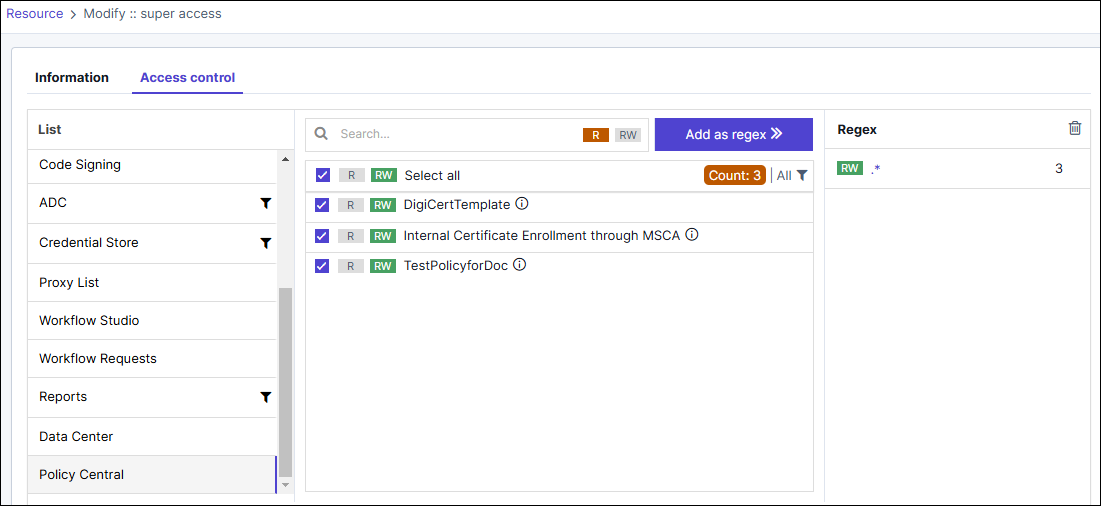
- You may create a regex pattern to assign R/RW access. Policies that match the pattern receive the specified access.
- Multiple policies can also be selected and given R/RW access.
- Click R (Read-only) to assign read-only permissions.
- Click RW (Read and Write) to assign read and write permissions.
- Click Save.
