
Post Upgrade Actions
- Reboot the System: Execute the command
below.
sudo reboot
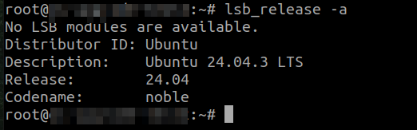
- Verification and Validation: After the system is rebooted, confirm the
upgrade to Ubuntu 24.04 by executing the command
below.
lsb_release -a
- If /etc/resolv.conf is a symlink to a different file, follow these steps:

- Remove the existing
symlink:
sudo unlink /etc/resolv.conf - Create a new file /etc/resolv.conf with the backed-up configuration.
- Verify the updated contents.
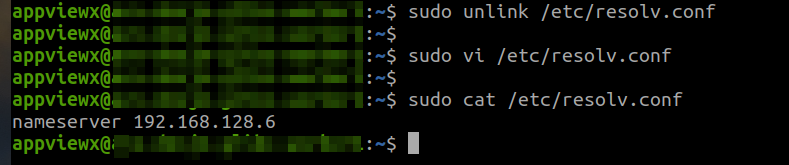
- Remove the existing
symlink:
- Enable and start the auditd.service again.
sudo systemctl enable auditd.service
sudo systemctl start auditd.service
sudo systemctl daemon-reload
Post executing, ensure that the auditd.service is active and running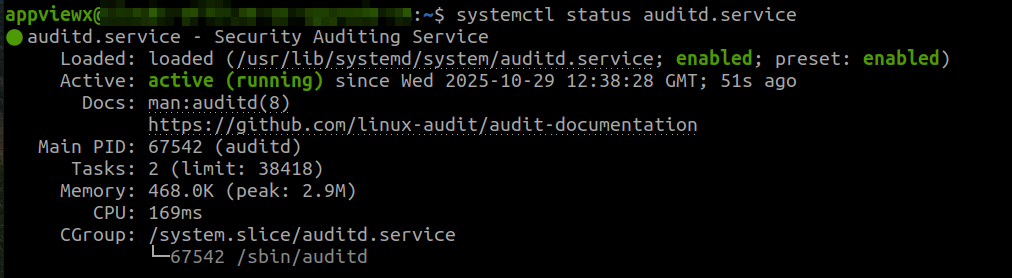
- Validation for On-Premise: After completing the upgrade for all nodes, log in
to the CLI and verify that all pods in the cluster are running using the command
below.
kubectl get pods -A
If all components are operational, access the application via the GUI to confirm a successful login. - Validation for Cloud Connectors (CC): Once the OS upgrade is complete, verify that the application is accessible through the GUI.
The system should now be successfully upgraded to Ubuntu 24.04.
Note:
- Monitor the system to ensure all applications and services function as expected.
- For assistance, contact AppViewX technical support.
