Kubernetes Certificate in Cloud Connector
The Cloud Connector (CC) installation process first provisions a Kubernetes cluster and then deploys the required Cloud Connector components on that cluster. During cluster creation, Kubernetes generates a certificate, commonly referred to as the kubeconfig certificate, which is used for internal communication such as accessing pods and retrieving cluster information. This certificate is valid for one year.
Once the certificate expires, Kubernetes can no longer communicate with the cluster. In the Cloud Connector environment, the only functionality impacted by this expiration is the Cloud Connector upgrade process; all other operations continue to function normally.
Kubernetes Certificate Renewal Process for New Cloud connectors
For new Cloud Connectors, the installation process creates either a cron job or a systemd service on the host machine, depending on the installation type. In Docker (K3d) mode, an entry is added to the crontab. In Standalone (K3s) mode, a systemd service and timer are created. These mechanisms monitor the Kubernetes certificate expiry on a daily basis and automatically execute the renewal script when the certificate is due to expire within the next 30 days.
During certificate renewal, if active traffic is detected on the Cloud Connector or if the renewal attempt fails, Kubernetes certificate renewal will be automatically retried the next day within the 30-day renewal window.
For Cloud Connectors installed after the v2026.1.0.0 release, Kubernetes certificate expiry monitoring and the complete renewal process are handled automatically.
- Docker-based Cloud ConnectorOnce the Cloud Connector is installed in Docker mode, a cron entry is automatically added as shown below. This ensures automatic monitoring of the Kubernetes certificate and triggers renewal before expiry.

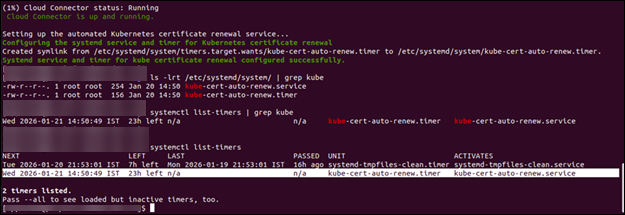
- Standalone based Cloud ConnectorOnce the Cloud Connector is installed in Standalone mode, a systemd service and timer are automatically created as shown below. This ensures automatic monitoring of the Kubernetes certificate and renewal before expiry for standalone Cloud Connector installations.
 Note: For K3d mode installations, the only prerequisite is that the user installing the Cloud Connector must have crontab access. If the user does not have crontab access, the error shown below will be displayed. This does not impact the Cloud Connector installation; however, automatic renewal of the Kubernetes certificate will not be configured. To enable auto-renewal, grant crontab access to the installation user and execute
./deps/utils/configure-kube-cert-renewal-service.shfrom the installation directory, using the same user who installed the Cloud Connector.
Kubernetes Certificate Renewal Process for Existing Cloud connectors
For existing Cloud Connectors, configuring the auto-renewal process requires executing a few manual steps. Follow the steps below to fetch the required Kubernetes certificate configuration and renewal scripts onto the existing Cloud Connector machine:
- Run the following commands to download the required Kubernetes certificate
configuration and renewal
scripts:
curl -k 'APPVIEWX_CLOUD_URL/download-kube-cert-configure-script' -H "mk:MASTER_KEY" -o configure-kube-cert-renewal-service.sh curl -k 'APPVIEWX_CLOUD_URL/download-kube-cert-renewal-script' -H "mk:MASTER_KEY" -o renew-kube-certificate.sh - Make the scripts executable and move them to the
deps/utils/directory:chmod +x configure-kube-cert-renewal-service.sh renew-kube-certificate.sh mv configure-kube-cert-renewal-service.sh renew-kube-certificate.sh deps/utils/ - To configure the auto-renewal process (cron or systemd service), run the
following command from the Cloud Connector installation directory
only:
./deps/utils/configure-kube-cert-renewal-service.sh - To renew the Kubernetes certificate immediately, execute the following
command from the installation directory
only:
./deps/utils/renew-kube-certificate.sh /home/appviewx/.kube standalone
Disable the Automated Kubernetes Certificate Renewal Process
The automated Kubernetes certificate renewal process, which is triggered daily through a cron job or systemd service, can be paused or disabled if required.
- Navigate to the Cloud Connector installation directory (where
install.shis located). - Run the following
command:
./avxctl kube-cert-renewal disable - This command disables the auto-renewal process. You can verify the
status by checking the
AUTO_KUBE_CERT_RENEWAL_ENABLEDparameter.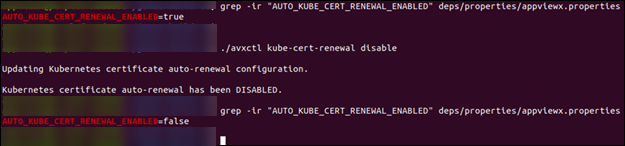
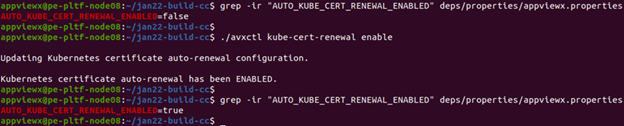
- Navigate to the Cloud Connector installation directory (where
install.shis located). - Run the following
command:
./avxctl kube-cert-renewal enable - This command enables the auto-renewal process. You can verify the status
by checking the
AUTO_KUBE_CERT_RENEWAL_ENABLEDparameter.