
Steps to Disable Kex Algorithm
-
Run command:
nmap --script ssh2-enum-algos -p 22       <ip
                        address>
Note: Replace<ip address>in the command with the actual IP.The deprecated algorithmdiffie-hellman-group1-sha1will be active. Refer the following image for the same.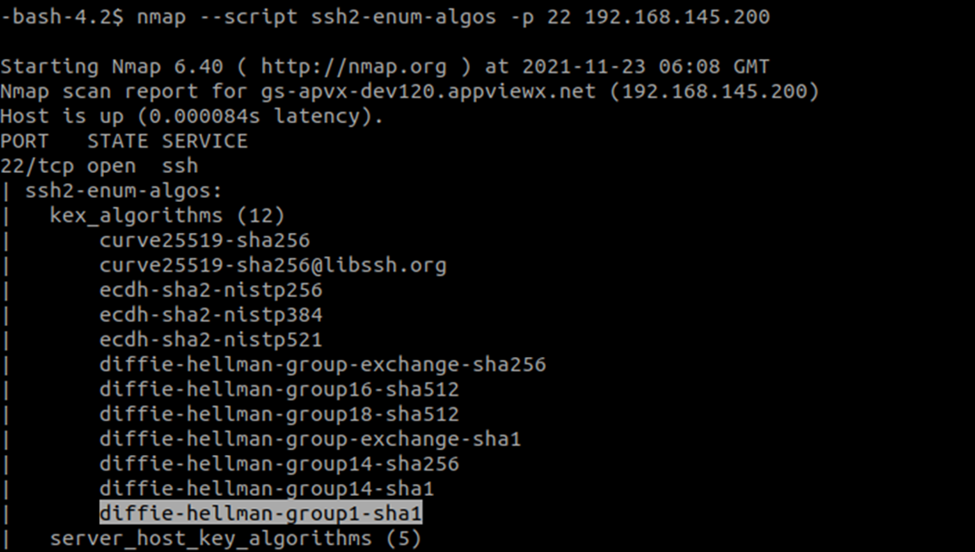
-
Run command:
sudo vi /etc/ssh/sshd_configsshd_configfile will open.Note: Make sure you have a KexAlgorithms list. This list should not includediffie-hellman-group1-sha1entry. Note: Below mentioned is the reference text used in the above image:
KexAlgorithms curve25519-sha256, [email protected],ecdh-sha2-nistp256,ecdh-sha2-nistp384,ecdh-sha2-nistp521,diffie-hellman-group-exchange-sha256,diffie-hellman-group16-sha512,diffie-hellman-group18-sha512,diffie-hellman-group-exchange-sha1,diffie-hellman-group14-sha256,diffie-hellman-group14-sha1- Save the changes and exit from the file.
-
Run command:
udo systemctl restart sshd -
Execute command:
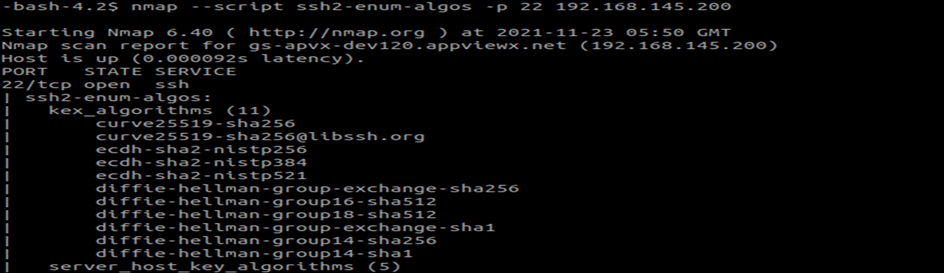
nmap --script ssh2-enum-algos -p 22 <ip address>Note:- Replace
<ip address>with the actual IP. - Confirm that
diffie-hellman-group1-sha1is disabled. Refer the following image for the same.
- Replace
