
Device State
High Availability of the applications can be ensured by configuring ADC devices in Active-Standby mode. This type of configuration will be planned for disaster recovery. In some cases, the devices in the group will be in active-active mode for handling the traffic efficiently. In AppViewX, the current mode of the device is called state and it will be displayed along with the device name in the inventory page. The device will be in any one of the following states,
| State | Color Code | Description |
|---|---|---|
| Active | Green Circle | The device is currently processing the traffic of
the application in the Active-Standby setup. |
| StandBy | Orange Circle | The device will be ideal and ready to take over
whenever the failover occurs in the Setup. |
| Offline | Grey Circle |
The device is taken down for maintenance and in this state, the traffic
will not be passed through the device.
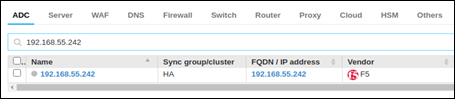 |
To know the current state, mouse over the color icon available before the device name.
This state will get updated in a particular time interval during configuration fetch from the device.
 For F5 and Citrix, if Syslog is enabled, it will get a near
real-time update whenever there is a flip in the device.
For F5 and Citrix, if Syslog is enabled, it will get a near
real-time update whenever there is a flip in the device.
