
Licenses for On-prem 
Accessing the License Page
| New Menu | Old Menu |
|---|---|
| In the Platform module, from the
navigation pane on the left, under SYSTEM ADMINISTRATION,
select License. The Settings :: License page is displayed with the License tab open by default. |
|
| For more information on how to switch between menus, click here. | |
| License Detail | Description |
|---|---|
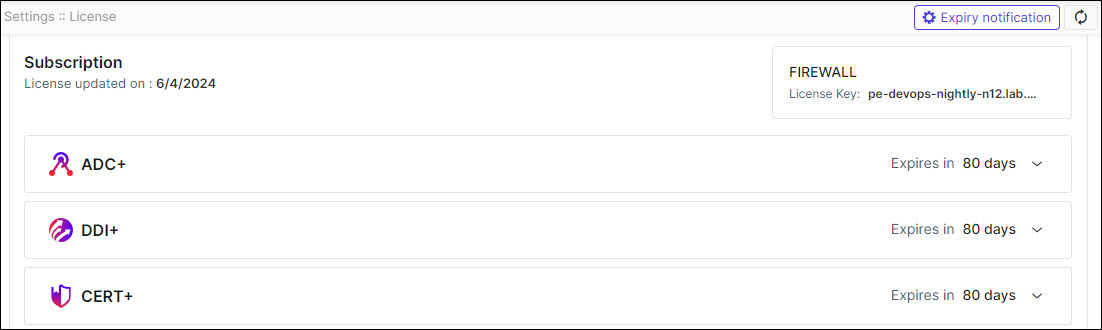
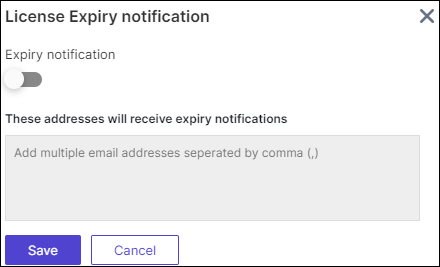
| Expiry notification | On the top right corner of the screen. Click
Expiry notification to enable the
expiry notification by including email addresses to receive
license expiration notifications from AppViewX.
The following license expiry notifications
are sent to the email address:
|
| Refresh | Click  (Refresh) icon to update the license details.
 |
| Subscription | This includes the details of license of AppViewX products subscribed by the user. |
| License updated on | Displays the date on which the license was last updated. |
| Account Name | Displays the associated account name. |
| License Key | Displays the License key details of the
user. The key is generated by the customer perspective.
Using which License Key of "16 digit Alphanumeric" value is
generated by the sales team. Only License Key generated with
installation key can be applied in the respective instance
of the product. Note: Consider only the
license key which is provided by the sales
team. |
| Product Name | This includes the details of subscribed licenses of all AppViewX products. |
| Expires in | Displays the remaining days until the respective products expire. |
| ADC | |
| Nodes | All the ADC devices (Independent devices, Controllers, Nodes within controllers) that are onboarded in the inventory. |
| Objects | All the ADC Applications (Unique GTM WideIPs, LTM VIPs) discovered from the onboarded ADC devices. |
| Firewall Devices |
Devices integrated with firewall network topology. |
| CLM | |
| Managed Device Certificates Instances | Managed Device Certificates Instances includes all certificates (Client, Code Signing, and Device) excluding Server and OTHERS types, from the inventory in the "Managed" state. |
| Managed Server Certificates Instances | Managed Server Certificates Instances include only server certificates from the inventory in the "Managed" state. |
| Managed Certificates Instances | Managed Certificate instance includes all certificates (Server, Client, Code Signing, and others) present in the certificate inventory in the "Managed" state. |
| Monitored Certificates Instances | Monitored Certificate Instances include all certificates (Server, Client, Code Signing, and others) present in the certificate inventory in the "Monitored" state. |
| DDI | |
| Managed Domains | Each DDI license subscription allows the user a number of managed domains that can be used. The number displays DDI managed domains currently in use. |
| KUBE | |
| Managed Kube Certificates | Starting v2026.2.0.0, AppViewX switches to a
certificate-based licensing model for Kubernetes (which
means you will see this metric only if you are a new
customer onboarded to v2026.2.0.0 or an existing customer
who has upgraded their license to v2026.2.0.0). This number indicates the total active Kubernetes certificates (certificates that are issued, used, and managed inside a Kubernetes environment) being managed in AppViewX. The count includes: Counting logic for the certificate-based
licensing model
|
| Managed Clusters | For all versions prior to v2026.2.0.0,
AppViewX uses a node-based and cluster-based licensing model
for KUBE. So, until you upgrade to v2026.2.0.0, your KUBE
license is measured using the Managed Clusters and
Managed Nodes metrics. Managed Clusters indicates the number of distinct Kubernetes clusters onboarded and managed in AppViewX. A cluster is a complete Kubernetes environment that is made up of one or more nodes. |
| Managed Nodes | For all versions prior to v2026.2.0.0,
AppViewX uses a node-based and cluster-based licensing model
for KUBE. So, until you upgrade to v2026.2.0.0, your KUBE
license is measured using the Managed Clusters and
Managed Nodes metrics. Managed Nodes indicates the total number of nodes being managed across all clusters in AppViewX. A node is a physical/virtual machine running in a Kubernetes cluster. |
| PKI | |
| Certificates Issued | Certificates issued are the total number of
certificates which includes the number of certificates
issued and all CAs created in PKI. Note: The certificate count begins from
the day the project is initialized in Google Cloud
Platform (GCP)and is maintained for a year from that
date. The count is reset annually. |
| Total CA(s) | Total CA is Number of CAs created from AppViewX. Each PKI license subscription allows the user a number of total CAs using this license. This is the number of total CAs used. |
| SIGN | |
| Signature Count | Total count of signing requests executed using the signing policy. |
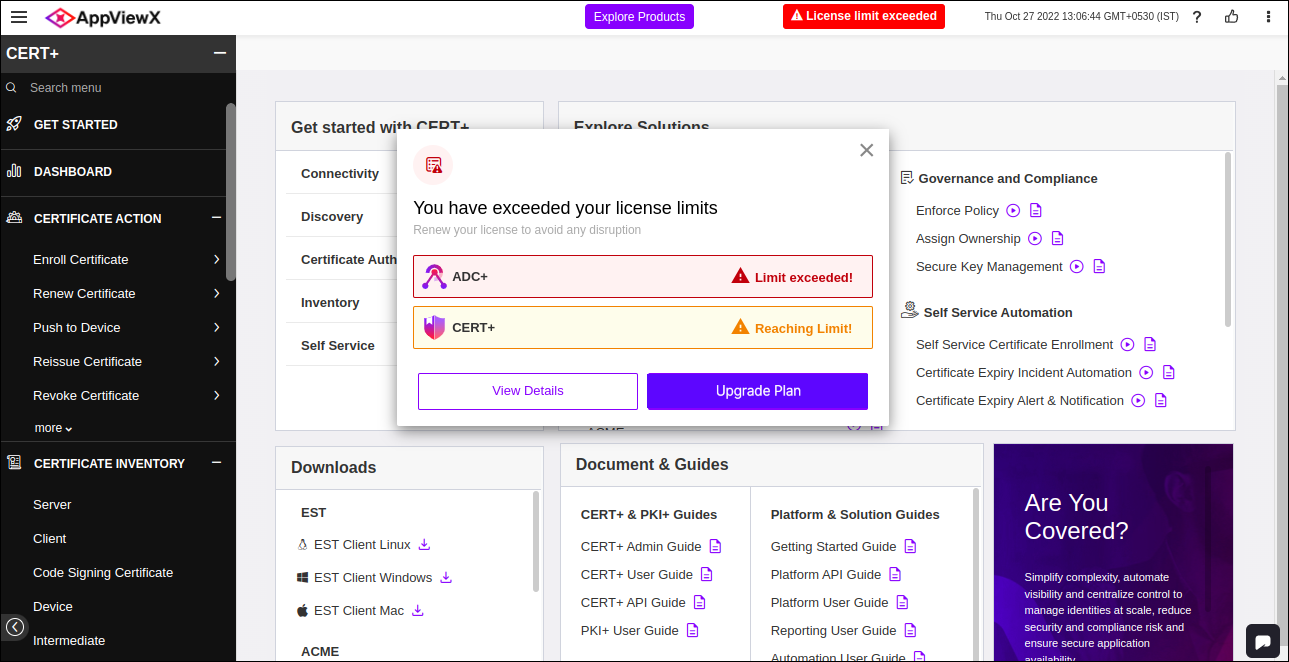
License Alerts
 Reaching Limit!
 If the usage reaches 90% of the threshold limit, then “Reaching Limit!” alert will be displayed.
 Limit exceeded!
If the usage exceeds the threshold limit, then “Limit exceeded!” alert will be displayed.
- You will see a header alert message while logging In, if the license
limit is exceeded.
Upgrading Licenses for On-prem
To upgrade a license:
-
On the Settings :: License page, to upgrade a license, click on the
Product Name you would like Upgrade
Plan.
A screen that lets you upload the license file is displayed.
-
In the Upload License dialog box, to upload a license file, click
Browse.
Note: License files only in the following formats can be uploaded: .txt and .zip.
- Go to the location of the license file, select the file, and click Open.
- Click Upload.
