
Log Files Path
SIGN+_Installer logs
AppViewX SIGN+ creates log files on Linux, macOS, and Windows, organized by the current date. This allows users to track file-signing activities and review any related error traces.
Windows
The SIGN+ installer logs for Windows depends on the environment variable
%temp%. 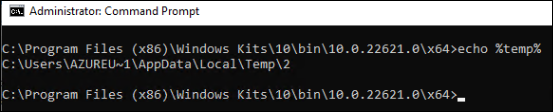 The installer log file can be found
at:
The installer log file can be found
at:
The installer log file can be found
at:C:\Users\<user>\AppData\Local\Temp\AppViewX Sign+\Logs\SIGN+Installer_Logs.logLinux and MacOS
On Linux and macOS, the SIGN+ installer log files can be found
at:
/tmp/AppViewX Sign+/Logs/SIGN+Installer_Logs.logAppViewX CSP Logs
Windows
The SIGN+ CSP path of the log file in Windows depends on the %temp%
environment variable.The installer log file can be found
at:
The installer log file can be found
at:C:\Users\<user>\AppData\Local\Temp\AppViewX Sign+\Logs\AppViewX_CSP_Logs_<Day>.logExample: C:\Users\<user>\AppData\Local\Temp\AppViewX Sign+\Logs\AppViewX_CSP_Logs_Monday.logAppViewX PKCS#11 Logs
Windows
The SIGN+ PKCS11 path of the log file in Windows depends on the %temp%
environment variable. The installer log file can be found
at:
The installer log file can be found
at:C:\Users\<user>\AppData\Local\Temp\AppViewX Sign+\Logs\AvxPKCS11_<Day>.logExample: C:\Users\<user>\AppData\Local\Temp\AppViewX Sign+\Logs\AvxPKCS11_Monday.logLinux and MacOS
On Linux and macOS, the SIGN+ installer log files can be found
at:
/tmp/AppViewX Sign+/Logs/AvxPKCS11_<Day>.logExample: /tmp/AppViewX Sign+/Logs/AvxPKCS11_Monday.logNote: To maintain
consistent user‑level isolation, the application writes logs to the user’s
%APPDATA% path, regardless of whether the installation is
performed in CurrentUser or LocalMachine mode.
