
Setting ACL Permissions to Infra Access Groups
You can assign/unassign resources the following access control list (ACL) permissions to infra access groups:
- RW denotes that users have Read-Write permission to the infra access group along with hyperlinks to request access to the group on the Access Control page. Users can modify or delete infra access groups.
- R denotes that users only have Read permissions to the infra access groups. Users cannot request access or modify or delete infra access groups.
- If R or RW permission is not assigned, then users will not be able to view the infra access groups.
To assign ACL permission to infra access groups:
-
Go to
 (Menu) icon > Platform > Identity > Resource.
- Click a resource name.
-
Click Access Control tab and select SSH Infra Access Groups from
the list.
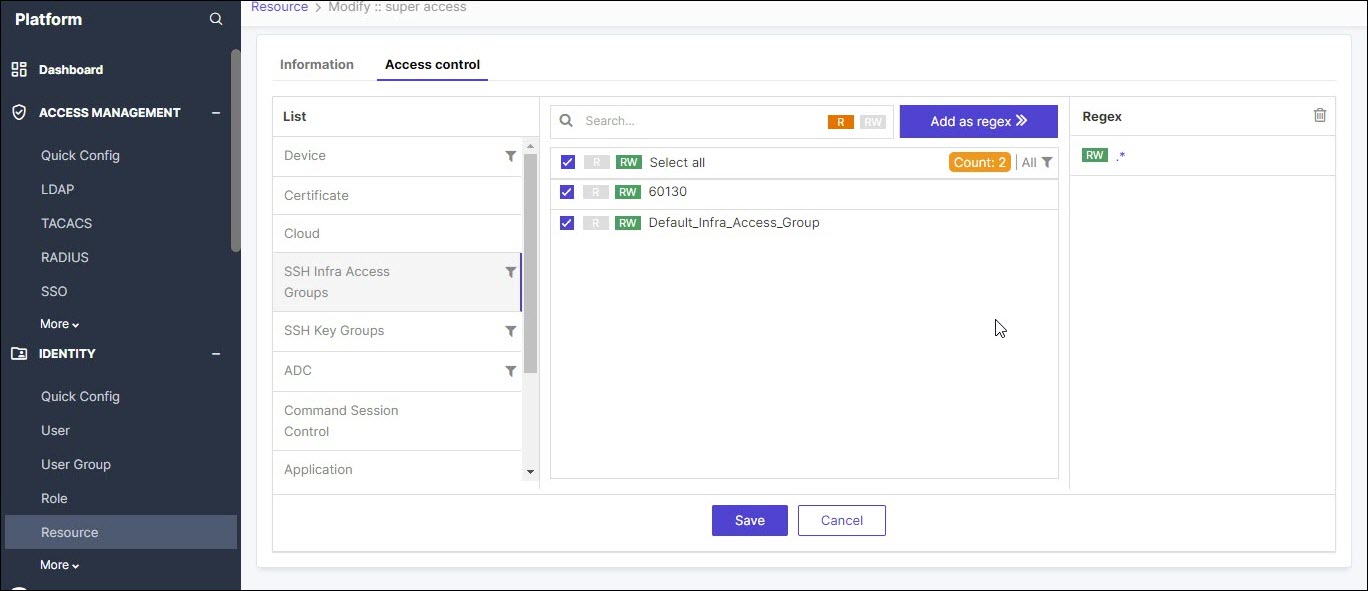 The infra access groups are displayed on the right.
 - Select the infra access group for which you want to assign permission by clicking the check box.
- Click R or RW button to assign the read or read-write permission.
-
Click Save.
A message, Successfully assigned/unassigned SSH groups data for resource super access, appears.Note: On deleting a resource, all ACL permissions from the associated infra access groups are also removed.
