
View the Backup Schedule for a Device
To view the backup schedule for a device:
-
Go to Go to Menu >
ADC+ > CONFIG
MANAGEMENT > Backup Configuration > Manage
Backups.
The Backup tab opens.
-
In the Backup tab, Hover your mouse over the
 Calendar icon of the device whose backup schedule
you want to view.
Calendar icon of the device whose backup schedule
you want to view.
-
A popup box appears, listing the frequency, start date, and start
time of backups for the selected device.
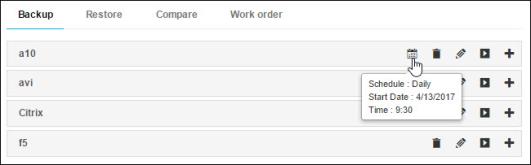 Note: If a device has no backups scheduled, no calendar icon appears in its row in the device table, as is the case for the a10 device that appears in the image above.
