
Akamai device
Akamai device addition will fail when the AppViewX node does not have an internet connection. For such issues, the recommended solutions are given below.
| Error Message | Possible Cause | Possible Solution |
|---|---|---|
| Failed to connect to <Device Name> due to Invalid credential. | Proxy is not configured properly for an Akamai device. | Configure proxy for the Akamai device as shown above and trigger config fetch for the same device. |
- Log in to AppViewX.
- Click Menu > ASSET MANAGEMENT > Device Inventory and search for the device that was added.
- Click on the status of that particular device.


Recommendation:
- Click Main Menu > Settings > General > Proxy.
- From the URL list, select akamai - *.luna.akamaiapis.net.
- Click Update.
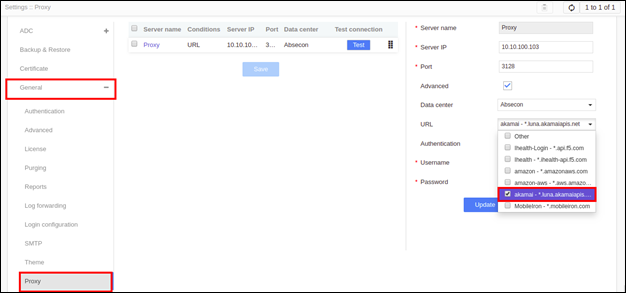
-
Click Save.
