
Signing Up for the Free Trial via the AppViewX Website
- Go to the SaaS free trial page.
-
On the landing page, enter your details and click Get
Stared.
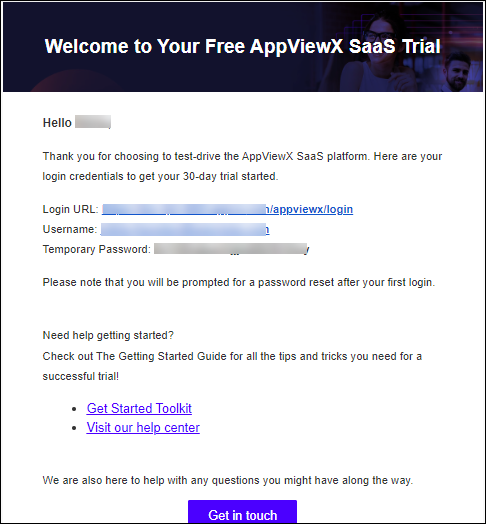
A confirmation message that you will receive an email from AppViewX on your registered email ID shortly is displayed. You will receive a verification email shortly.The welcome email you receive will include your login URL and temporary password.
-
In the verification email, click Verify your Email
Address.
A welcome email, with your login URL and temporary credentials, is sent to your registered email ID.
 Troubleshooting: If you have not received the welcome email, please get in touch with [email protected].
 - Go to the login URL.
-
On the login page, enter the credentials you received in the welcome
email.
The OTP verification screen is displayed and an OTP is sent to your registered email ID.
-
Enter the OTP and click Continue.
The Change password screen is displayed.
-
Enter and reenter your new password in the Enter New Password and
Confirm New Password fields respectively, and click
Continue.
Note: Your password must:
- Have at least one uppercase character
- Have at least one lowercase character
- Have one special character such as ~!@#$^&*_-+=|()
- Have minimum of 6 characters and maximum of 24 characters
- Not contain user name
- Not contain more than 3 same characters continuously, for example, aaa
- Not contain blank space
A message notifying successful password change is displayed.You will be redirected to the login page.
-
Login to the application with your new credentials.
An OTP is sent to your registered email ID.
- On the OTP Verification screen, enter the OTP received and click Continue.
-
On the Terms of Service screen, select the I accept the terms and
conditions checkbox and click Continue.
The AppViewX Platform landing page is displayed.
-
To try a product, click Try Now to start your 30-day trial of the
product.
You will be redirected to the GET STARTED page of the selected product.Note: The 30-day trial period starts from the day you receive the welcome email. The trial period can be extended by 60 more days (which makes the trial duration 90 days). For more details on how you can extend your trial, please reach out to AppViewX Support.
- For instructions on installing the AppViewX Cloud Connector, refer to the corresponding documentation here.
- To simplify your interaction with the product features, refer to AppViewX's exhaustive documentation in the form of the following guides:
You can access the complete AppViewX documentation here.
