
mTLS Enablement
Overview
The AppViewX SaaS platform utilizes a lightweight agent called the Cloud Connector to facilitate secure communication between the customer’s on-premises environment and the SaaS infrastructure. This communication was previously secured using standard TLS. For customers requiring mutual TLS (mTLS), the configuration used to be performed manually by the AppViewX SRE team. To streamline this process, mTLS enablement has now been automated, thereby removing the dependency on manual intervention.
Prerequisites
- Ensure Cloud Connectors are upgraded to the latest version to enable seamless and automated mutual TLS (mTLS) configuration.
- The provisioning cluster must have Cloudflare integration configured, including API credentials in the Integration Settings, to facilitate automated root certificate upload and DNS record mapping via the Cloudflare API.
- Each cluster is required to have an internal tenant that is up and running, as the Cloudflare WAF rule configuration is initiated through this tenant.
- SMTP settings must be configured for the internal tenant, as mTLS client certificate expiration motifications will be sent via the internal tenant.
- Customers who are currently using mTLS and who wish to switch to the automated mTLS enablement process are required to upgrade to the latest version. After the upgrade, the AppViewX SRE team will assist in enabling the mTLS using the latest root and client certificates.
General Constraints
- mTLS is not supported for Cloud Connectors deployed via HELM.
- mTLS will be enabled only for active and running Cloud Connectors. Connectors that are in a stopped or paused state will continue operating with default TLS communication.
- Only self-signed certificates are supported for mTLS. Customer-provided or third-party CA certificates are not currently supported.
- Automated renewal of the root certificate is not supported. In the event of root certificate expiration, the SRE team must be contacted.
- By default, the root certificate is valid for 10 years, while the mTLS certificate is valid for 1 year
- Expiry notifications for the mTLS client certificate will be trigerred 90 day prior, and the renewal process will be handled 30 days before expiry.
mTLS Enablement for Existing Cloud Connectors
In this method the mTLS is enabled for existing Cloud Connectors within the customer's environment. The AppViewX SRE team internally utilizes an automated workflow to perform mTLS enablement for a tenant’s Cloud Connectors.
mTLS Enablement for New Cloud Connector
This method details the mTLS enablement process for newly deployed Cloud Connectors. As noted in the prerequisites, Cloud Connectors can be installed via multiple methods—Manual, Automated, Native OS-based, or HELM-based. mTLS enablement is supported across all installation types except HELM-based deployments.
- Log in to the AppViewX UI.
- Go to Menu > Platform > CONNECTVITY > Cloud Connectors. (The Settings :: Cloud Connector page is displayed.)
- For the connector status that is "Waiting for Approval", click
Approve to initiate communication. Note: If any one cloud connector is enabled with mTLS communication, then at the inventory page level, the mTLS enabled information icon will be displayed.
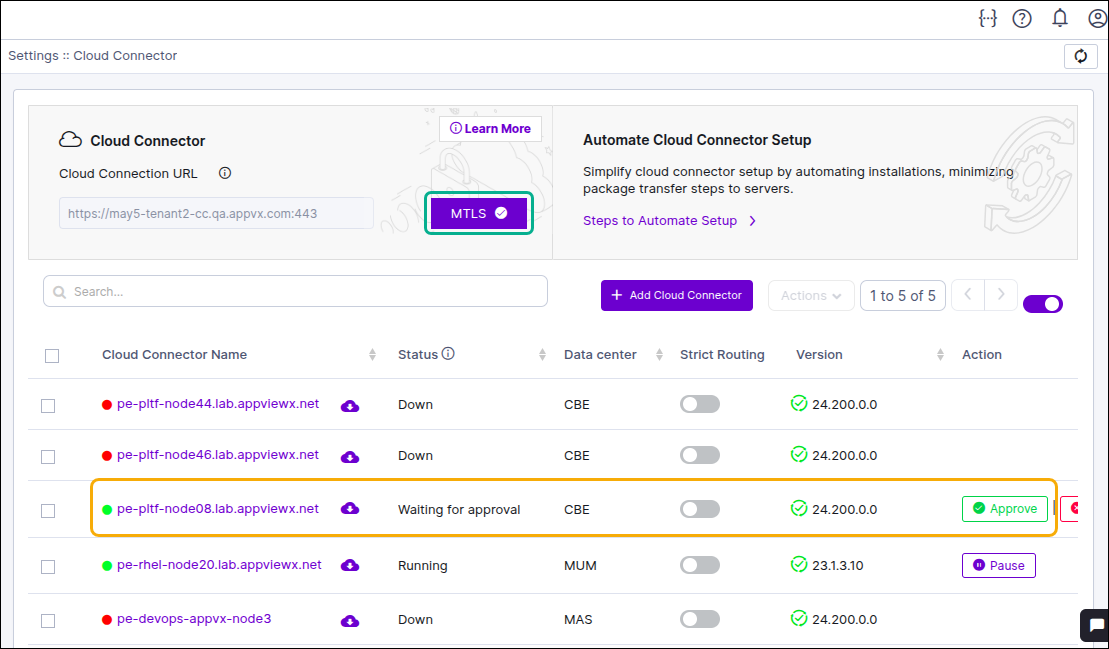
- To view the status of the cloud connector, click on the Cloud Connector
Name. The mTLS status will be shown individually for each cloud
connector.
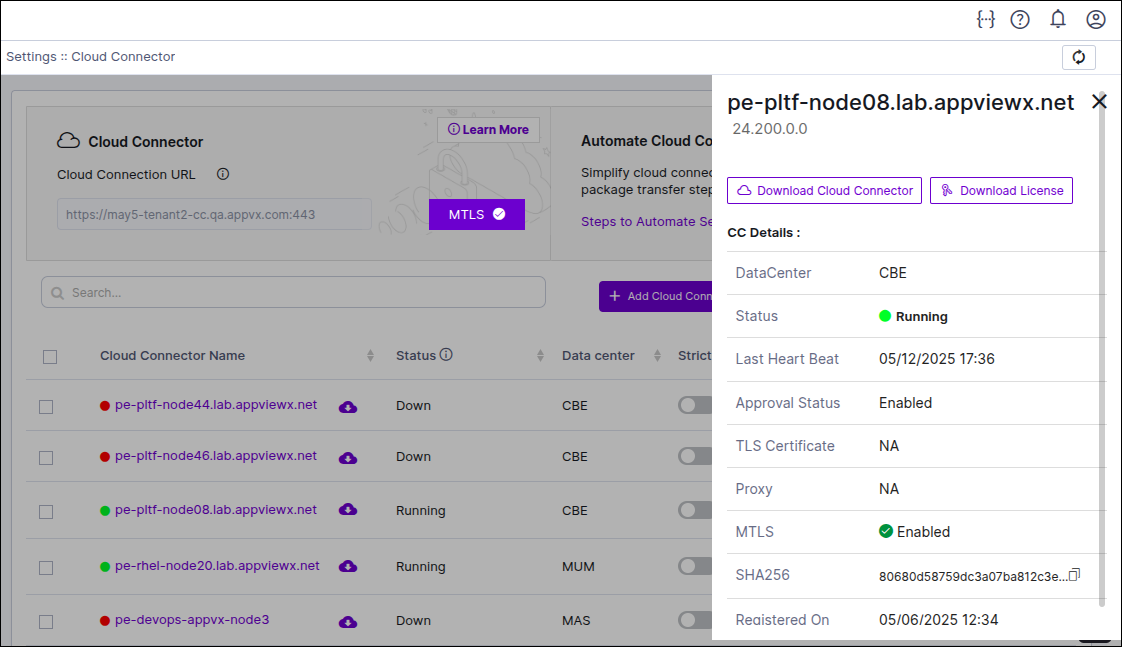
If mTLS has been selected, the enablement process is automatically triggered during approval. A client certificate is generated and pushed to the Cloud Connector. Upon successful certificate deployment, the system attempts to enable the corresponding WAF rule. If WAF rule activation fails, up to three retry attempts are made.
After the WAF rule is enabled, the system waits two minutes for a heartbeat signal from the connector. If no signal is received, mTLS is considered unsuccessful. The WAF rule is then disabled automatically to avoid disruption, and the connector falls back to TLS communication. The failure is logged and notified to the AppViewX SRE team for further investigation.
Auto Renewal process of mTLS Certificate
To maintain uninterrupted and secure mTLS communication, client certificate renewal is fully automated—no manual intervention is required from the customer.
A scheduled job runs daily to identify certificates nearing expiration (within 30 days). Upon detection, the system automatically triggers the renewal process.
- Client Certificate Validity Period: 1 year.
- Expiry Notification: Sent 90 days before the certificate expires.
- Renewal Process: Automatically managed by the system ahead of expiration.
- Auto-Renewal: Performed 30 days prior to expiry without customer involvement.
If any failure occurs during the certificate renewal process, a notification will be sent to the AppViewXSRE team via email.
In case the renewal fails on a given day, the system will automatically retry the process the next day. This retry mechanism continues daily for up to 30 days or until the renewal is successfully completed.
