
Configuring Role Based Access Control
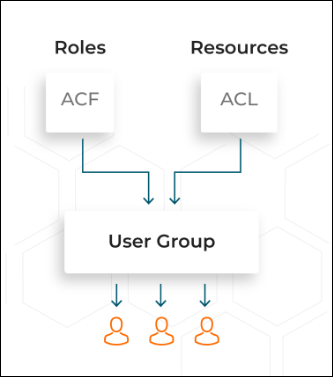
RBAC lets employees have access rights only to the AppViewX functions and network resources they need to do their jobs and prevents them from accessing information that doesn't pertain to them.
To get
an overview of the actions authorized for a particular user in the DDI+
module:
| New Menu | Old Menu |
|---|---|
In the Platform module, from the left pane, under IDENTITY, select Role. The Role page is displayed, with all the roles listed with their Name, Description, and Status. |
From the main menu, select Account > Role. The Role page is displayed, with all the roles listed with their Name, Description, and Status. |
|
Note: For more information on how to
switch between menus, click here.
|
|
- On the Role page, select a role from the dropdown list, for example admin.
-
To see the list of permissions that can be defined for this role, under the
Authorized Functions tab, click
 to expand DDI. A selected check-box
indicates that the corresponding action has been authorized in the DDI+
module.
to expand DDI. A selected check-box
indicates that the corresponding action has been authorized in the DDI+
module.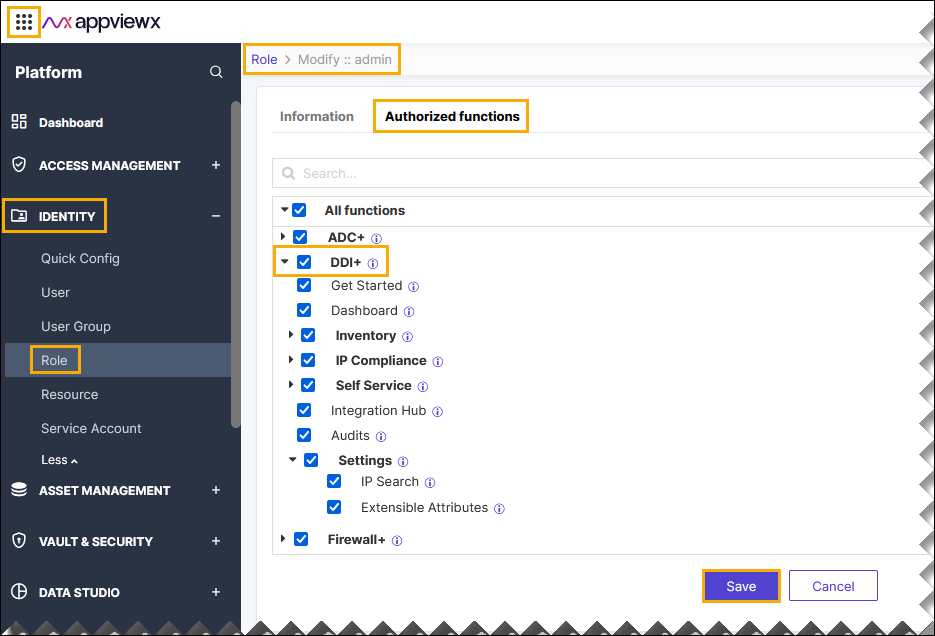 The following table describes the various actions that can be authorized or restricted in the DDI+ module:
Action Description Get Started Access to get started page of the DDI+ module. Dashboard Access to all the dashboards that are associated with the DDI+ module. Inventory Access to all the inventories that are associated with the DDI+ module. IP Compliance Access to IP compliance of DDI+ module. Self Service Access to Self Service of DDI+ module. Integration Hub Access to Integration Hub of DDI+ module. Audits Access to Audits of DDI+ module. Settings Access to Settings of DDI+ module.
