
Workflow Request
You can group your workflows accordingly and create a workflow catalog. The list of grouped workflows in the catalog will be displayed in this section.
- The Workflow Request section displays the total number of All, Open, Closed, and Failed requests, clicking upon these tabs displays the corresponding workflow details in a table.
- You can also perform the following tasks:
-
Right-click the Request ID and select one of the following options from the pop up that appears:
-
Rollback - Triggers an alternative rollback workflow that you have added or imported for the workflow.
-
View details - Displays all the tooltips configured in the Global variables.

-
-
From the Request ID column, you can click on the request for which you want to view the details. On the tabs in this screen, you can perform the following tasks:
For the workflow(s) containing grid component(s) and script(s) to generate data, you can click the
 (Download) button
to save the data to PC in XLS or CSV file format.
(Download) button
to save the data to PC in XLS or CSV file format. - Search for a request using the Search field.
-
Click the
 (Filter) button to select the options you want to use to
sort the requests.
(Filter) button to select the options you want to use to
sort the requests.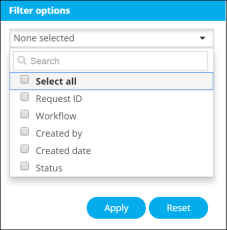
-
