
Configuring EST Client
-
Navigate to the following extracted folder:
- For Linux and Mac: appviewx_est_client_installer_generator > input
- For Windows: AppViewX_EST_Windows_Client > Generator > input
-
Replace the following files from the input folder with
your authentication key and certificate with the same names. Ensure that the key
file is not encrypted and the certificate file is in .crt format. (This
certificate must be trusted by the EST server. The issuer certificate must be
configured in the EST server setting under Client Authentication > Issuer
Certificate):
- est_auth.crt
- est_auth.key
-
Open the credentials file in the Notepad editor and add
the following details in two separate lines:
<username> <password>Note:- The username and password are the values that are configured in the agent setting under Client Authentication in the EST Agent Server Settings.
- This step is not required when the Authentication Mode is set to Only Certificate TLS in AppViewX EST agent setting.
- When the Fallback credentials under Client Authentication is set to Logged on user credentials on the server side, enter the AppViewX web username and password (used to login into the AppViewX web page/UI) in the credentials file. (This feature is only available from AppViewX server version Ganga - 2022.1.0 and later)
-
Open the secure_config.json file and edit the
configuration file.
The details of the parameters are as described:
Structure of the secure_config.json file:
- General parameters: Comprises the general configuration parameters such as allowed domain names and the option for silent uninstallation.
- EST server parameters: In this section, you can provide the configuration details of EST server such as hostname, port number, and agent name (which represents the agent name in the server settings) specific to the certificate type.
- Certificate parameters: For the mentioned certificate_type in the EST server parameters, you can provide certificate-specific details in this section. These details include CSR parameters, SAN details, and the configuration related to re-enrollment.
For more details regarding the parameters, see the following tables:Figure 1. Sample secure_config.json file 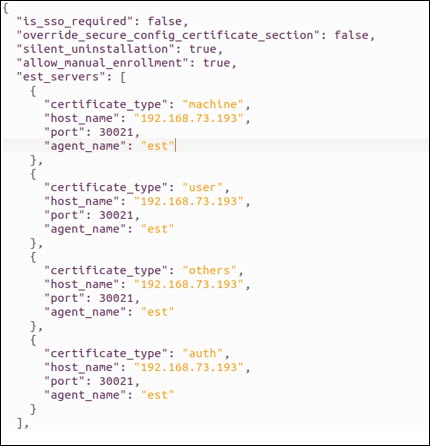
Table 1. Field descriptions for the General Section parameters Parameter Type Mandatory Description silent_uninstallation Boolean No This field is accessed by secure_config.json during the installation process. - By default, this value is false. You will be prompted to uninstall the previous client.
- If the value is true, then you will be prompted to uninstall the previously installed versions.
allow_manual_enrollment Boolean No - By default, this value is true allowing you to enroll and re-enroll the certificates using the commands.
- If the value is false, then the certificates are allowed to enroll and re-enroll the certificates using the commands.
install_for_all_users Boolean No (applicable only for Windows) Accessed by secure_config.json. This field is used to avoid multiple installations of AppViewX client in multiple places. - By default, this value is false,
then
- no admin access is required and the client is installed in HKEY_LOCAL_MACHINE registry
- EST task schedulers are not created as this task creation requires admin privileges. This option is mainly used for non C:\ folder installation and manual EST auto commands.
- If the value is true, then you must have admin privileges to install. AppViewX client is installed in the HKEY_CURRENT_USER registry.
- If the client is reinstalled, the installed path is retrieved from the Windows registry based on this flag, and the client is uninstalled before being reinstalled.
override_secure_config_certificate_section Boolean No The Boolean value determines the certificate parameters to be considered during installation. - By default, this value is false.
- If the value is true, then you can override the config.json’s certificate parameters value over the secure_config.json’s value. This is applicable only for the certificate section field values. Precedence table based on this field is as given below.
Table 2. Precedence table for Certificate Section based on the override_secure_config_certificate_section Flag override_secure_config_certificate_section flag Values in secure_config.json Values in config.json Result - Values taken from FALSE Present Absent secure_config.json Absent Present config.json Absent Absent Do nothing Present Present secure_config.json TRUE Present Absent secure_config.json Absent Present config.json Absent Absent Do nothing Present Present config.json Table 3. Field descriptions for the EST Server section parameters Parameter Type Mandatory Description certificate_type String Yes This parameter is case-insensitive. It can have the following values: - auth
- user
- machine
- others
Duplicate values are not allowed.
host_name String Yes A valid IP/FQDN provided in EST endpoint configuration. For SAAS, use Cloud Connector IP/FQDN as provided in the endpoint configuration. port_number Integer Yes Can have a value between 1 and 65535. Make sure it matches the port number specified in the EST endpoint configuration on the AppViewX GUI (Default port is 30021). agent_name String Yes This is the EST endpoint setting name from the AppViewX GUI. It must not include any spaces. If the agent name is not present in either the secure_config.json or config.json, the defaultEST agent name is used. After configuring the server and the general parameters, the certificate section must be configured. The following image provides the example of the certificate section. The certificate section must be configured for the certificate_types mentioned in the EST server section.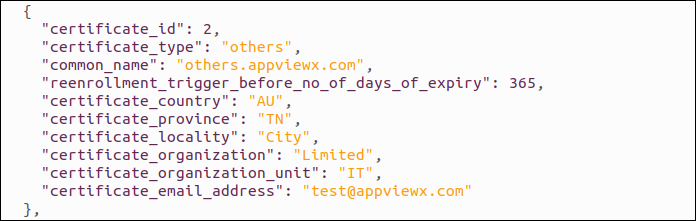
Table 4. Field descriptions for the Certificate Section parameters Parameter Type Mandatory Description certificate_type - Linux and Mac: appviewx_est_client_installer_generator
- Windows: Generator
String Yes This parameter is case-insensitive. It can have the following values: - auth: Generates the common name based on the est_auth.crt auth file present in the input subfolder within the folder mentioned:
- user: Generates Logged in Username as CN for the CSR.
- machine: Generates logged in machine name as CN for the CSR.
- others: Generates configured common_name as CN for the CSR and installs the certificate in the key_store.
certificate_id Integer Yes Contains the certificate ID. Duplicate values are not allowed. certificate_country String No The country code and must be in ISO standards (2-letter code). certificate_province String No The province name; it can be up to 128 characters. certificate_locality String No The locality name; it can be up to 128 characters. certificate_organization String No The organization name; it can be up to 64 characters. certificate_organizationUnit String No The organization unit; it can be up to 64 characters. reenrollment_trigger_before_no _of_days_of_expiry Integer Yes The number of days before re-enrollment can be triggered. The value can be up to 36500. common_name String Yes (only for others certificate type) Cannot have more than 64 characters. allowed_san_domains List [string] No This field can only be used in secure_config.json and will not be considered even if it is provided in config.json. Must contain proper domain names.
For example, if the allowed_san_domains contain ["a.com","b.com","c.com"] and the san_dns_names contains ["test.a.com","test.b.com","test.c.com", "test.d.com"], then only the first three domain names from san_dns_names are considered and used.
If allowed_san_domains parameter is absent in the file, then all the SAN restrictions are removed.
san_dns_names List [string] No Cannot have more than 255 characters - Must be a proper FQDN san_ip_addresses List [string] No Must be valid IP addresses. store_name [Applicable for Windows ONLY] String No If the certificate type is others, then the store name must be either user or machine. certificate_email_address String No Cannot have more than 255 characters - Must be a valid email address custom_values Custom values provided are framed during EST client run time to frame the field values that trigger the enrollment. They can be accessed by both config.json and secure_config.json. The custom values are defined below: Example to use custom_values is "custom_values":[
]{"field_name":"common_name", "base_value":"$MACHINE", "additional_value": ".appviewx.com", "operation":"prepend"}Here the common will be changed to machinename.appviewx.com
field_name N/A Yes Common_name or san_rfc822 name to which the values must be added. base_value N/A Yes Value can be $MACHINE or $USER or any other value. - If value is $MACHINE, then the machine name is considered.
- If value is $USER, then it will be the machine logged in user name.
additional_value N/A Yes Any specific value. operation N/A Yes Values can be append or prepend. - If the value is append, then the final value is fieldvalue = base_value + additional_value.
- If the value is prepend, then the final value is fieldvalue = additional_value +base_value. If the field name is san_rfc822name, then the final value is added in CSR’s SAN value.
Note: The above parameters are accessed by config.json and secure_config.json files unless specified.Note:- Having all types in the config.json file is not mandatory. You can retain only the necessary type and remove the rest. For example, if you want to enroll only User CERT, then you can delete machine and other types from the list.
- If there are any absent fields or parameters in the secure_config.json, they are disregarded and not enforced as mandatory. This is because you can set up the missing fields in the config.json file located in the installer folder.
